
In Use For Centuries, And Still So Powerful
Point & Figure charts do not need introduction, they have been one of the leading chart techniques for over than a hundred years.
Now the Point & Figure comes as offline chart to MT4. You may apply any standard MT4 indicator to such chart.
With use of OmniaRemote placed on the chart you simply apply graphics overlay over the offline candle chart and get the traditional chart look.
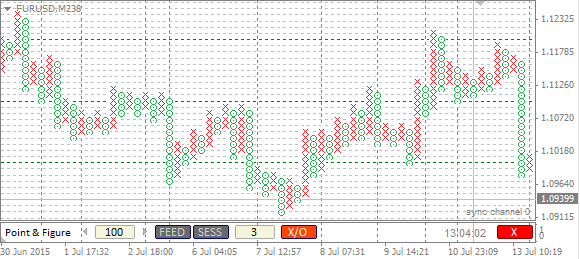
The offline Point & Figure chart supports the traditional view as an overlay above the identical OHLC candles chart
The next video shows the effect of wicks on the PnF chart. While it has no effect on the X/O canvas, the candles have same bodies but different H/L. The current candle displays wick only to a point where the current price crossed the X/O level, the rest of the wick gets wiped.
The Advantage
This P&F chart is build as an offline chart, using the standard Omnia Charts engine.
This brings you following advantages:
- You may run an EA on P&F chart.
- You may attach any standard or custom indicators to a P&F chart.
- Correct tick volume in each P&F candle
- Correct starting candle time
- Your chart won’t repaint when relaunched
- Your chart can be easily re-adjusted
… and many more, following a list of features of Omnia Charts offline engine, like session detection, tick reuse ability, disconnection, account change detector or the Strategy tester compatibility.
Get OmniaBar License Key Bundled @

Omnia Remote Is Recommended
Do not miss to place Omnia Remote on the offline chart.
Only with the indicator you can switch on/off the display of the traditional X/O layer on the top of the offline candles background.
Unique Features
What are additional features of Ovo offline generators?
- the generator is an indicator rather than a script or EA, which makes it more comfortable for deployment
- input setting is adjustable from multiple places: from the input dialogue, or from the entry box of an indicator sub-window, or from the offline chart using additional indicators (Omnia Remote, Omnia Auto Range). Settings on the offline chart makes the range switching as flexible as switching between timeframes.
- safe timeframe switching of the feed chart (no need for sacrificing the feed chart for a single timeframe)
- generator can detect and optionally break chart into trading sessions
- generator uses all available timeframes for the initial model, and it is not bound to a single selected timeframe
- when starting up, the indicator selects the chart starting anchor from the user-defined chart candles count
- a single indicator can serve multiple identical offline charts (a single chart ID in multiple windows)
- detects significant drop-outs in feed and rebuilds the offline chart after the feed updates
- displays consistent candle tick volume calibrated to regular timeframes, so you may rely on the tick volume in your analysis and EAs
- guards for a change of the feed server, so it updates the chart if you switch between accounts
- works properly with symbols having MQL unfriendly names (like “EURUSD..”, i.e. trailing double dot in the name)
- reports unexpected time gaps in the MT4 history, reports inconsistencies between symbol timeframes
- excludes phantom (no volume) ticks
- fixes incorrect input for a non-trivial instrument tick size
- can decrease chart refresh rate on demand
- indicator development is still open, you may expect fast fixes for new Metatrader builds
HI,
Was just wondering why no one is answering these questions. Has the support stopped for these products? I ask because I am interested in using them.
Thanks,
gram.
Hello gram, the support still goes on, however there are no serious updates expected, as Metatrader 4 evolution stopped at build 1090, a long time ago. There is a pending task for redesigning the PnF chart overlay, and I will implement after its turn comes, according to priorities.
OK. Thanks. I am not worried about updates at the moment, but about getting the existing one to work. Did you see my letter sent to support stating that the chart overlays but shows the bar chart, not the Pnf. Any idea what the problem is?
Thanks,
Gram.
Hello gram, the OmniaRemote must be attached to the offline chart.
Many thanks, MIlan,
However, I have just tried to do as you suggested in your email Unfortunately, while I was waiting for for you to answer my query, the trial expiredIt now tells me that I now have to wait 84 days to test out your suggestions.
Thanks,
Regards,
gram.
HI,
I am asking out of desperation. I have been trying for weeks (with time off for the days to download a new trial) to use a Point and Figure chart on MT4. I cannot for the life of me get it to show Xs and Os. All I get are bars. If someone uses PNF, can they help?
Thanks,
gtam.
how I can chang color
such as down trend red and up trend green
Please i need a guide to use the P and F chart in my MT4
i have a question regarding Point and Figure chart
i really want to buy it but i have 1 question only
what happens if the current candle moved up (the previous candle was up candle)
https://i.vgy.me/Zo5LwT.png
see the picture, i really can’t understand what will happen
1- will the current candle disappear and the previous candle gets continued ?
2- or the wick below the current candle will turn into a red candle and a new green candle will be formed ?
3- something else (please explain it to me if i’m wrong)
thanks and good luck with sales <3
hello,
is there a possibility to change the colours of the X/O Chart???
http://www.guppytraders.com/gup140.shtml
De Veiller is the father of point and figure and when he has used 1 box reversal PnF he has mixed X and O together in one vertical line together. When X and O by 1 BoxReversal get mixed together , you can see the trading range much more clearly.
i wanted to ask is it possible to implement an option in your pnf indicator to switch to De Veiller Pnf , when the BoxReversal is 1 Box. I think to program this will not take much time , i would be very appreciate when u could do it .
On the above link and the last image of the webpage you can see a example what i mean
Hi ,
I am having trouble opening the pff document on mt4 . It won’t let me open the offline pff chart. I am on using macbook pro.
Regards
Oliver
hello i have and account in a server but when i use offline charts for that server symbols metatrader shows me wating for updates and remains in that state
how can i solve this problem?
Hi, is there an alternative to PayPal payment. I want the pnf chart.
Will I have the rights to the MT5 versions when they are release, or I will have to buy the indicators again? Otherwise I am gonna wait.
Hello Alberto, Mt5 would not be just a ported version of MT4, due to a completely different chart design in MT5. I do not have MT5 versions, so the question is hypothetical.
Hi Milan, can you please answer the question above?
I have just found a problem with your point and figure indicator. It does not allow use to configure the color of the columns (neither on the indicator itself or the omnia remote), not only that but the X column is hard coded red (the one that goes up) and the O column is hard coded green (the ones goes down), so it makes it really confusing. Also, the way it plots the 1 box reversal chart is wrong, this is the correct way it should look, according to DuPlessis: https://ibb.co/Y0MZtX1
Hello Alberto, well, the PnF chart is not perfect. The colours are hardcoded, so they are as they are. And you are right, the chart with 1-box reversal is not condensed, despite many prefer it that way. Also figures are missing.
I’m using the PnF charts, when will the colours be changed? Thank you
i’ve download the pnf and the omniaremote. However, I not able to toggle the x/o button to show the point and figure. Can you help here ?
Try to re-attach the Remote, I have no such experience myself, so hard to guess how to help.
Hi Milan,
Wondering If I’m able to use the Omnia AutoRange tool to size the PnF chart?
You may, in this case you control the distance between marks (the main parameter).