
When Price Level Matters
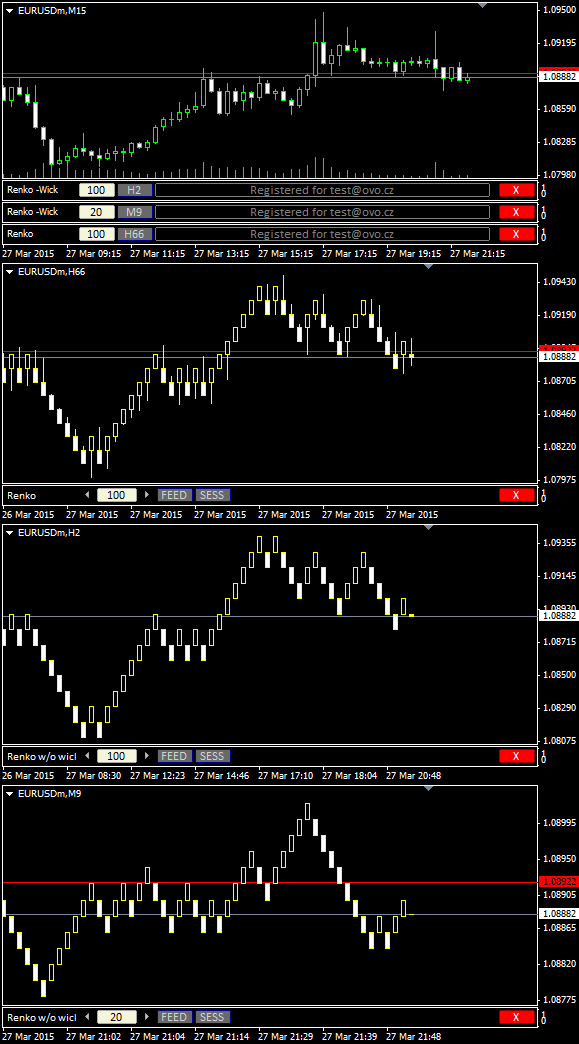
Renko charts are used for alternate price charting. Unlike the usual time framed chart – where every candle represents a fixed time interval – the goal of the Renko chart is expressing price movement in levels, called bricks.
Installation Guide and First Steps
Watch the video to learn how to install and use Renko.
For privacy reasons YouTube needs your permission to be loaded.
Get OmniaBar License Key Bundled @

Unique Features
What are additional features of Ovo offline generators?
- the generator is an indicator rather than a script or EA, which makes it more comfortable for deployment
- input setting is adjustable from multiple places: from the input dialogue, or from the entry box of an indicator sub-window, or from the offline chart using additional indicators (Omnia Remote, Omnia Auto Range). Settings on the offline chart makes the range switching as flexible as switching between timeframes.
- safe timeframe switching of the feed chart (no need for sacrificing the feed chart for a single timeframe)
- generator can detect and optionally break chart into trading sessions
- generator uses all available timeframes for the initial model, and it is not bound to a single selected timeframe
- when starting up, the indicator selects the chart starting anchor from the user-defined chart candles count
- a single indicator can serve multiple identical offline charts (a single chart ID in multiple windows)
- detects significant drop-outs in feed and rebuilds the offline chart after the feed updates
- displays consistent candle tick volume calibrated to regular timeframes, so you may rely on the tick volume in your analysis and EAs
- guards for a change of the feed server, so it updates the chart if you switch between accounts
- works properly with symbols having MQL unfriendly names (like “EURUSD..”, i.e. trailing double dot in the name)
- reports unexpected time gaps in the MT4 history, reports inconsistencies between symbol timeframes
- excludes phantom (no volume) ticks
- fixes incorrect input for a non-trivial instrument tick size
- can decrease chart refresh rate on demand
- indicator development is still open, you may expect fast fixes for new Metatrader builds
Hello Milan
I have been using mean renko for many years with no problems but recently have.
On a new PC with windows11 the latest MT$.
Meanrenko will not feed live data to the offline chart correctly. The offline chart shows no live data and a few days worth of chart instead of the current day.
In the Meanrenko file there is an expired free window. I have re enterd my code with no success.
Any ideas please?
Kind regards
Paul
Hello Paul, your license has been deployed on 3 computers already, so if you need to reorganize it, go to the License Self Care page and reset it first.
Hello, Is there a chance for renko on the MT5 platform?