
When Price Level Matters
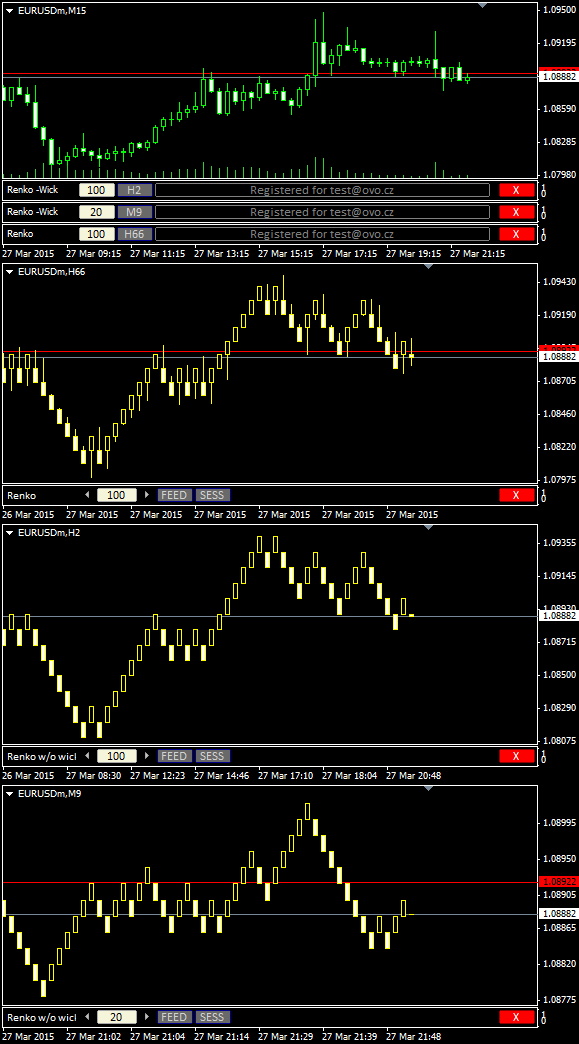
Renko charts are used for alternate price charting. Unlike the usual time framed chart – where every candle represents a fixed time interval – the goal of the Renko chart is expressing price movement in levels, called bricks.
Installation Guide and First Steps
Watch the video to learn how to install and use Renko.
For privacy reasons YouTube needs your permission to be loaded.
Get OmniaBar License Key Bundled @

Unique Features
What are additional features of Ovo offline generators?
- the generator is an indicator rather than a script or EA, which makes it more comfortable for deployment
- input setting is adjustable from multiple places: from the input dialogue, or from the entry box of an indicator sub-window, or from the offline chart using additional indicators (Omnia Remote, Omnia Auto Range). Settings on the offline chart makes the range switching as flexible as switching between timeframes.
- safe timeframe switching of the feed chart (no need for sacrificing the feed chart for a single timeframe)
- generator can detect and optionally break chart into trading sessions
- generator uses all available timeframes for the initial model, and it is not bound to a single selected timeframe
- when starting up, the indicator selects the chart starting anchor from the user-defined chart candles count
- a single indicator can serve multiple identical offline charts (a single chart ID in multiple windows)
- detects significant drop-outs in feed and rebuilds the offline chart after the feed updates
- displays consistent candle tick volume calibrated to regular timeframes, so you may rely on the tick volume in your analysis and EAs
- guards for a change of the feed server, so it updates the chart if you switch between accounts
- works properly with symbols having MQL unfriendly names (like “EURUSD..”, i.e. trailing double dot in the name)
- reports unexpected time gaps in the MT4 history, reports inconsistencies between symbol timeframes
- excludes phantom (no volume) ticks
- fixes incorrect input for a non-trivial instrument tick size
- can decrease chart refresh rate on demand
- indicator development is still open, you may expect fast fixes for new Metatrader builds
and where can i take licance key?
Hello Serkan, please click the Pricing & Order item in the top menu.
Hello, i am student at spartan trader, and nikos recomend me this site to buy the renko indicator, he also told that you usually give a discount to spartanfx traders. could you help me with that
regards
If you notice the ad at the very bottom of the page, you may get the discounted price with Spartan Traders, in case you are their student. Please search for the discount link in their students’ zone.
HI Milan.
I have the Renko charting with Spartan. I have also used test helper for renko which works well. The problem I’m having is that I can’t get enough bars on the chart to back test on the 3 pips per box settings. Is there something I can do to get more bars. Thanks Chris.
Are you still trading with Nikos bro and what has been your experience?
Hi Milan, would you mind considering round numbers for renko? Wicks would still show the detailed price action but renko based on round numbers would be much better.
TEM ESSE RENKO PRA MT5?
How to install to Macbook (we use Crossover to run mt4 in mac)
Unfortunately I do not have knowledge about emulators. Please contact me using Contact Form with more detailed description.
I’m using crossover and I can install any EA. You just have to find the C: directory. Email saya aja biar saya jelasin. lj_zain@yahoo.com
Hi… i develope my own expert advisors and would like to use the renko bar indicator in my own EA
( for example to detect reversal signals )
is that possible with the licensed version…
if not … what are the possibilities …
Thanks
Hello Thierry, the usual way is attaching the expert to the generated Renko chart. It would work well with both the trial and the licensed indicators.
Including indicator into the expert is quite advanced task and it needs a reason.
Hello Ovo team,
I am thankful for your work … what i have noticed is that the volume in the hybrid renko indicator and by the normal renko indicator is different …. renko indicator has no zero volume per bar … i wanted to ask why is it so and which indicator i should use of both them to have a more accurate volume histogramm … i know that it cant be 100% the same but by some bars it is a huge different
I would be appreciate if u could answer to my question
ok thank you….:)
what I’m really intrested in is the lines of codes required to obtain the renko bar ( high low open clode ) for any target bar. How is that performed ?
For example if i place my ea on the generated renko chart what lines of code would my ea require to access the the high low open close of a generated renko bar.?
thanks in advance… 🙂
Hello Thierry, for accessing candle values in any chart from MQL4 code use either common constants (see http://docs.mql4.com/predefined ) or functions (see http://docs.mql4.com/series )
thank you very much for your help… I’ll look that up…
Concerning backtesting is it possible to backtest with the renko bar indicator…?
if yes… where can i find information to know how to backtest using renko chart bars only
thanks 🙂
Renko charts are artificially constructed charts from other charts, so using them within the standard Strategy tester for expert income is very approximate. Nevertheless it is useful to test the expert mechanics, and for such purpose you may use the tester helper at http://ovo.cz/products/free-mt4-utilities/offline-test-helper/
Hello,
I downloaded the meanrenko indicator and copied it to my latest version of mt4 duely.
Opened data folder from files, opened mql4 folder, and copied into the indicators folder. And i have allowed dll inputs as well.
However the mean renko indicator is not working and i’m getting a msg like “indicator cannot create this offline chart, try to set other offline tf in the input”. I tried to set m2 and m3 timeframe but it still gives the same error.
I tried to use the indicator with my previous built mt4 broker and it works fine in my not updated mt4 terminal broker.
Does the indicator need to be updated? I’m planning to buy it after testing it but i couldn’t make it work. Waiting for a response. Thanks in advance
Hello Mehmet, in case there are problems to select the offline timeframe though you checked other offline generators do not use it, then restart the Terminal. It might be some lost script blocking the file handle.
Hello,
Would it be possible to add the following features to the indicator: audio alerts every time a new bar is added and be able to activate and deactivated ?
thanks 🙂
Hello Thierry, for an acoustic signal watching for a new bar you can use any of numerous dedicated indicators placed directly on the offline chat.
Hi there,
I see that you are selling Omni bar 3 user licence for $ 120. I only have one laptop. How much is it for only 1 licence?
SK
Hello SK, a single license cost is $120. You can use it on up to 3 computers.
Hi there,
Do your renko or median renko indicator use too memory or too much resources and slow down PC/laptop?
SK
Probably yes, it depends on the length of history of the other timeframes, as MT4 duplicates history buffers during calculations.
Hello can you explaine us how the volume is calculated per renko bar( let say 100pips renko bar)?
Because i notice some bars have volume 0
This is renkobar (100 pips) applied on 1 minute chart EURUSD (forextime broker):
2015.03.20,22:15,1.08200,1.08300,1.08130,1.08300,2196
2015.03.23,00:00,1.08300,1.08400,1.08300,1.08400,0
2015.03.23,00:00,1.08400,1.08500,1.08400,1.08500,0
2015.03.23,00:00,1.08500,1.08600,1.08500,1.08600,0
2015.03.23,00:00,1.08500,1.08675,1.08400,1.08400,2561
2015.03.23,00:35,1.08400,1.08428,1.08300,1.08300,2353
Thank you!
Hello Silviu, they are called phantom bars, they traverse gaps where no tick exists.
Thx for reply , I already bought renko bars and i am verry happy with them 🙂
I finished my trail period and I have a license key. how do I enter it to activate the indicator again?
Hello, is it possible to use downloaded tick data to generate renko chart with your indicator instead of using M1 history?
I imagine that I run an empty ExpertAdvisor in startegy tester on downloaded tick data. I would drop your indicator on the chart. If the indicator is able to generate chart with standard time frame (for example M5) than I would be able to backtest my real EA on that chart.
thank you
Hello Luna, unfortunately it is not possible. Accessing the history files from the Strategy Tester is restricted (to eliminate fraudulent test results).
For using the tick data in a live environment – it could work, but you needed the tick data from your broker. The generator uses only such tick data, which match the M1 timeframe. If you had such proper broker tick data, I could build a script generating the tick file for live environment (for the chart model builder).
Hi
your charts look great. is there an option to use ATR to determine the brick size? or will it be in the updates in the near future?
Thanks
Hello
I am totally happy with the renko indicator I bought from you. The reason for this is that I have great passion with trading renko. I tried all free renko indicators and I wanted to open many charts looking for the best setup. I always had an issue with MT4 freezing. It was frustrating until I tried the free version of yours and then I bought the license.
It helped me a lot in refining my strategies and Iam glad to say that today is the first day of trading live.
I love the idea of have three sub-windows for different renko settings. It just makes my life easier and trading enjoyable.
I even tried the MTF indicators with different renko box sizes. I can easily call the offline charts like M2 M3 M6 etc and get a reading for Multiple Brick Size.
Good work!
Hello. I have same problem. However the mean renko indicator is not working and i’m getting a msg like “indicator cannot create this offline chart, try to set other offline tf in the input”. I tried to set m2 and m3 timeframe but it still gives the same error.
Your advice does not help:
administrator June 16, 2015 at 6:59 am – Reply
Hello Mehmet, in case there are problems to select the offline timeframe though you checked other offline generators do not use it, then restart the Terminal. It might be some lost script blocking the file handle.
Hello Alex, sorry for late answer, but I did not know what the reason was. Currently the possible reason emerged. Though I have not yet received full confirmation, it looks like some non-ASCII characters in user profile name (the folder of the current user under the C:\Users\) result in incorrect evaluation of the MT4 data path and the indicator fails to locate the proper data locations. However it does not affect only my indicators, but also other MT4 behaviour.
If you want to test if this was your case, please create a new user whose name has only ASCII characters, and try to test the MT4 there. (You may remove the user after the test).
Hello Milan-I bought the Renko without wicks generator months ago.Great work! I don’t think that I can do without it. Recently it has been sticking, I would have to re-login to get an
up to date chart. So I reset the key. At the moment I can’t paste the Activation Code into the dialog box. Would you give me a hand to straighten this out? Thanks Chris
Milan,
Quick question, I have the latest version of the Renko’s, however the offline chart shows M16423. Is that correct if I want a 15 minute chart, etc.? How do you ensure the timeframe on the offline chart matches what you want, i.e. would like to look at 15 min and say 30 minute chart? Just want to ensure that I am looking at the correct time frame on the offline chart.
Cheers!
Binarylonewolf
Hello Tammy,
The offline chart receives pure random number if you leave the entry blank in the Inputs tab. I would recommend to fill it, the random number may get altered in some conditions, and then your original offline chart becomes an orphan. In addition, this number determines a period separator (daily, weekly, monthly and yearly). On the other hand this number has no effect on candlesticks, the generated chart has the same shape on any offline timeframe.
Hi Milan,
I recently purchased RenkoBar License Key.
Prior to using OVO Renko Bar Indicator I had struggled with creating Renko Charts using such Products as Renko Live Charts, Renko Bar Charts EA and several others. The main problem with all these EA’s and Indicators was that there never was enough history to create a functioning Off Line Chart. I was constantly trying to add history to make the off line charts function so that I could trade them.
OVO Renko Bar Indicator is absolute genius! OVO Renko Bar Indicator si far superior to any other Renko Chart creation tool on the Internet. OVO Renko Bar Indicator is terrific value.
I have an intense interest in understanding the value of adding Renko Auto Range to my Off LIne Charts. There is little or no information on the Internet about the value of trading with Renko Bars that are created with a range for actual bar size as opposed to an arbitrary bar size.
I respectfully request that you place more information about the significance of Trading with a Renko Chart based upon a Renko Auto Range Bar on your Website. I have a gut feel that it is very important.
Any Trader that is considering trading with Renko can not do any better than to create his/her charts with OVO Renko Bar Indicator.
Thank you
So many renko bar variations on this site. What is the best one for trading? I am confused which one to choose … pro renko bars , mid renko or other renkos on this site.
What i want is renko that doesnt repaint because i want to backtest and memorize renko patterns
Thx
Hello Andy, there are three indicators on this page, the two of them are Renko and differ only in wicks, the third one is a mod for experienced traders, not suitable for common Renko strategies.
You may use them all concurrently with the single key.
Hello. Please i seem to be having issues with my renko charts. After installation and following the required process, the renko chart refuses to work, and time is always behind. I have tried using mt4 build 971 and 988, but the case is still the same. The renko charts doesnt just populate, it stays on one spot and is late. Please Help
Hello Tari, please use the contact form when requesting support.