
When Price Level Matters
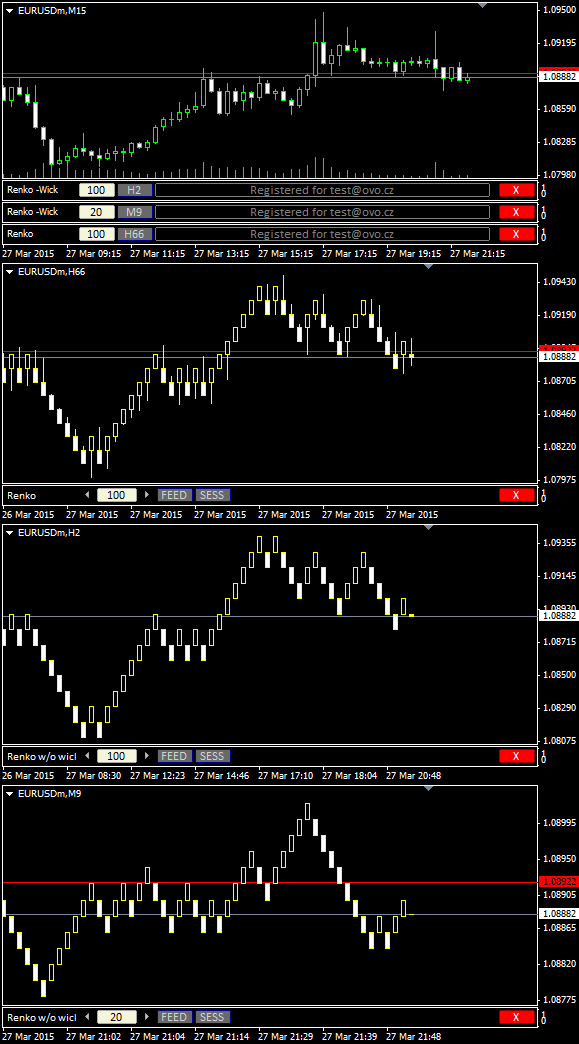
Renko charts are used for alternate price charting. Unlike the usual time framed chart – where every candle represents a fixed time interval – the goal of the Renko chart is expressing price movement in levels, called bricks.
Installation Guide and First Steps
Watch the video to learn how to install and use Renko.
For privacy reasons YouTube needs your permission to be loaded.
Get OmniaBar License Key Bundled @

Unique Features
What are additional features of Ovo offline generators?
- the generator is an indicator rather than a script or EA, which makes it more comfortable for deployment
- input setting is adjustable from multiple places: from the input dialogue, or from the entry box of an indicator sub-window, or from the offline chart using additional indicators (Omnia Remote, Omnia Auto Range). Settings on the offline chart makes the range switching as flexible as switching between timeframes.
- safe timeframe switching of the feed chart (no need for sacrificing the feed chart for a single timeframe)
- generator can detect and optionally break chart into trading sessions
- generator uses all available timeframes for the initial model, and it is not bound to a single selected timeframe
- when starting up, the indicator selects the chart starting anchor from the user-defined chart candles count
- a single indicator can serve multiple identical offline charts (a single chart ID in multiple windows)
- detects significant drop-outs in feed and rebuilds the offline chart after the feed updates
- displays consistent candle tick volume calibrated to regular timeframes, so you may rely on the tick volume in your analysis and EAs
- guards for a change of the feed server, so it updates the chart if you switch between accounts
- works properly with symbols having MQL unfriendly names (like “EURUSD..”, i.e. trailing double dot in the name)
- reports unexpected time gaps in the MT4 history, reports inconsistencies between symbol timeframes
- excludes phantom (no volume) ticks
- fixes incorrect input for a non-trivial instrument tick size
- can decrease chart refresh rate on demand
- indicator development is still open, you may expect fast fixes for new Metatrader builds
Is plotting renko brick size based on percentage method supported by ovo renko indicator?
No, the input for the brick size is in MT4 points and the brick size is constant within the entire chart.
Good morning,
A few days ago we bought the mean renko fxt builder plugin, to be able to backtest in mode visual, and we need to know if this plugin also serves to be able to make an EA that works in real time to execute it in a VPS, or on the contrary it only serves to perform backtest. Best regards.
Hello Alberto, the VPS should not be a problem (unless you meant the Metaquotes VPS, which was not a VPS). However the script is meant only for preparing a testing chart, it has no support for live charts.
Hi,
I saw somewhere the Dynobars.
Do you have something like these bars?
Regards
momo
Hello momo, no, I do not have such chart.
Hi Milan, I have 2 questions as below:
1. Does renko works on MT5
2. I want to setup Renko on my mobile phone? What should I do?
Thank you very much for your support!
1- No.
2- If your Windows phone can run MT4 Terminal (not sure if mobile Windows system is compatible), then add the indicator the same way as on the desktop.
Hello sir.
I am trying to test my EA using the Renko FXbuilder buti am getting this error 2019.12.20 16:54:09.198 TestGenerator: file “5\tester\history\EURUSD240_0.fxt” cannot open [5]
after the data generation,
please can you help with what i am doing wrong,
Thank you,
Hello.
For which product I have to pay to receive Wicked Renko Bricks?
All the Renko generators on this page share a single Renko license.
hi I want to buy renko no wick bar and that I have from orginal renko briks but when I want to buy I dont know whits it is also I looking for Omnia remote.
Where can I buy renko no wick bar and omnia for that please? thx
Hi Milan,
As i understand this indicator for Renko chart requires DLL to be allowed. A VPS service in Mql4 dosent allow DLLs or non stantard TF charts.
Is there a way around this?
I mean How is possiple to use these Renko charts in MT4?
Thanks
Harris
Hello Harris, yes, DLLs need to be enabled. Not sure if alternate charts can run in the MQL hosting servers, probably there is a way. However the indicatror would require distribution via MT4 Products channel, which has very cruel license politics, and it would require dropping features, which make it precise, robust and fast. So it is not likely I would insert it into my plans in the future.
Thank you for fast reply.
One last question though…… Apart from Metaquotes VPS, according to your knowledge, is it possible that the indicator and the Renko charts will work in other kind of VPS or the same restrictions, as in Metaquotes, apply?
Thanks Harris
Yes, any ordinary VPS can run the terminal like your computer can. MQL VPS is rather a remote nest for MT4 terminal than a complete VPS.
Ok! Great!
Again thanks for timely replies.
Keep up the good work.
Harris
Hi, I had purchased the licensed version in 2018. That was “RenkoBar (RenkoNowickBar, RenkoHybridBar) Indicator” however, I am trying to download that but isnt available. Is there a newer version that I need to download? thank you!
Hi Milan..!!
I want to buy renko license but i don’t have paypal.. do you accept skrill?
i have emailed you many times but no luck sadly
I trade jforex that has true classical renko bars – broker data differences aside – am I going to see the same bar patterns as I see on jforex? I know MT4 uses time as a heartbeat and not price.
I cannot say, as I do not know if the feeds and construction priciples are identical for both platforms.
Is there a renko chart for MT5
MT4 has not been supported new broker
any plan to develop renko on MT5?
Plans are for the berginning of the next year.
waiting for your good product
Hello
I bought both the renko and the point org products, i was wondering if it is possible to add a feature in one of these two that enables me to control the number of bars (boxes) in which the reversal happens. Meaning, the renko chart has a 2 bar reversal where as the point origional has one bar reversal, i would like to have the ability to change that say 3 or 4 bars reversal.
Thanks
hi
can i use this renko chart builder for run EA on it for real account?
Yes, you may.
Hi there my friend, are you working on the MT5 version already?
Also, can we apply custom indicators to the renko chart?
I would also love the mt5, you make good products for mt4 hopefully you’ll also make good products for mt5 too
Me too, but it is not a good sign when the developers stop responding important questions about the products… I noticed in all pages that he haven´t been replying, I wonder if he just abandoned this.
Hi Milan,
I’m trying to use your indicator from within an EA that I’m writing. I’m using iCustom to access the indicator and specifying the indicator arguments as you’d expect. For all the drop-downs though I don’t know what physical values you’re associating with the enum’s – so I’m just guessing but no matter what I try I get this:
2021.03.16 22:31:50.841 RenkoNoWickBar USDCHF,M61: Output TF not set properly. Forcing value 62. Please fix the input next time to avoid accidental loss of the offline chart.
I’m not sure if the problem is connected to the arguments or to a “windows profile name’ which you mention in other responses on this site – my profile name is all ascii though so I’m not sure if it’s this.
Any assistance or documentation on how to access the indicator via iCustom would be much appreciated – many thanks.
AndyD.
Hi Milan,
I developed a EA that run on top of your Renko indicator.
the EA implements price action decisions.
problem
in live trading the open/close price seems to be for the tick data and not for the renko candles.
when I tested mu EA with FXTBuilder the open/close is of the renko bar.
what is the way to know that a bar is closed from code?
The bar closes (sets its close price) when the incomming tick appears outside the brick range. Both the open and close prices are artifitial with Renko, they may not reflect any tick quote.
Both the RenkoBar and FXTBuilder work in the same way – when the new candle tick arrives, the recent close and the new open are printed at the brick edge level, while the (first) incomming tick appears as a close price of the newly evolving candle.
When phantom bricks happen, then both RenkoBar and FXT builder print them with zero volume and no tick is generated in the tester. That differes from a simple M1-like testing, where the zero volume candles are not allowed.
can you have multiple instance of diffrent currency pairs from one renko builder? I am talking specifically about the normal renko with wicks
Hi,
I have some problems with my own Indicators running on the Renko no Wick charts, some of them are repainting/adding Arrows on each bar Closed.
Don’t have this problem on the Renko with Wicks.
Perhaps I should add some extra code in the indicator to avoid this?
Hope You can help me.
Before buying I want to check that this chart doesn’t use any DLLs? I plan to use this on MT4 VPS service which unfortunately doesn’t allow DLLs. Also, is there a restriction to use this on one account only or can I use it for multiple accounts?