
When Price Level Matters
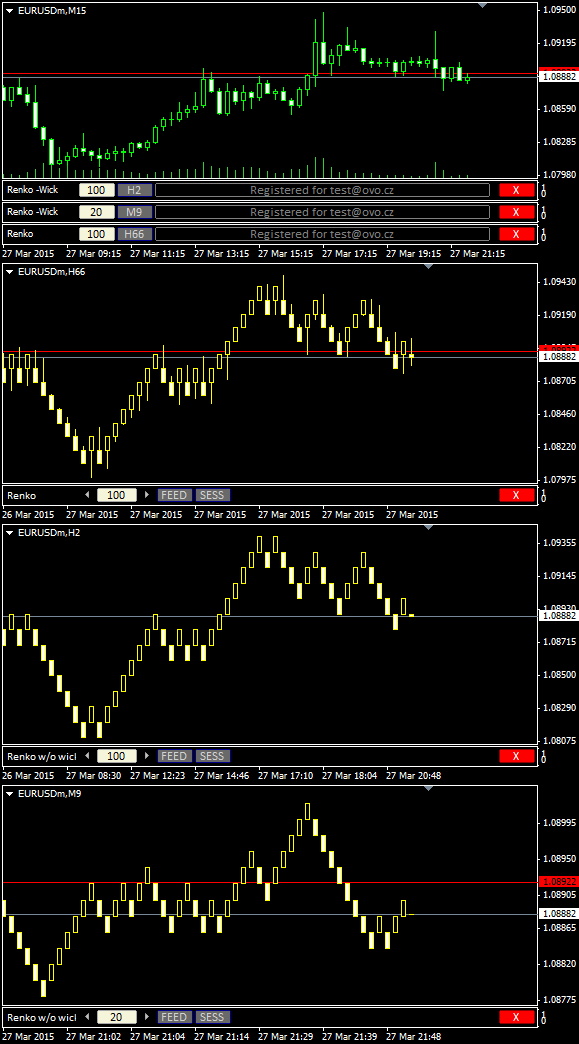
Renko charts are used for alternate price charting. Unlike the usual time framed chart – where every candle represents a fixed time interval – the goal of the Renko chart is expressing price movement in levels, called bricks.
Installation Guide and First Steps
Watch the video to learn how to install and use Renko.
For privacy reasons YouTube needs your permission to be loaded.
Get OmniaBar License Key Bundled @

Unique Features
What are additional features of Ovo offline generators?
- the generator is an indicator rather than a script or EA, which makes it more comfortable for deployment
- input setting is adjustable from multiple places: from the input dialogue, or from the entry box of an indicator sub-window, or from the offline chart using additional indicators (Omnia Remote, Omnia Auto Range). Settings on the offline chart makes the range switching as flexible as switching between timeframes.
- safe timeframe switching of the feed chart (no need for sacrificing the feed chart for a single timeframe)
- generator can detect and optionally break chart into trading sessions
- generator uses all available timeframes for the initial model, and it is not bound to a single selected timeframe
- when starting up, the indicator selects the chart starting anchor from the user-defined chart candles count
- a single indicator can serve multiple identical offline charts (a single chart ID in multiple windows)
- detects significant drop-outs in feed and rebuilds the offline chart after the feed updates
- displays consistent candle tick volume calibrated to regular timeframes, so you may rely on the tick volume in your analysis and EAs
- guards for a change of the feed server, so it updates the chart if you switch between accounts
- works properly with symbols having MQL unfriendly names (like “EURUSD..”, i.e. trailing double dot in the name)
- reports unexpected time gaps in the MT4 history, reports inconsistencies between symbol timeframes
- excludes phantom (no volume) ticks
- fixes incorrect input for a non-trivial instrument tick size
- can decrease chart refresh rate on demand
- indicator development is still open, you may expect fast fixes for new Metatrader builds
How does your “OmniaAutoRange” calculation compare to using the ATR
Could OmniaAutoRange give the same answer as 50% ATR (14)
Could you also advise on choosing the best Time Frame for the calculation ?
Regards
It compares as ATR to an average range. The average range is a sum of candle ranges devided by a number of candles involved. So you are not receiving ATR or any other calculation from this indicator, just an average across the selected period of time.
Sir I used renko bars indicator and now wanted to get activation key.is this for lifetime activation
Yes, the license is lifetime.
Hello Brother,
Download RenkoNoWickBar.ex4 indicator
Can I ask some questions?
Can I run the EA smoothly on this indicator?
Is Acquisition Lifetime?
Does the indicator have updates or not, if so, how will I know how to update it?
Please leave here the link to buy this indicator.
Sorry for my English, it’s not my native language.
Thanks to listen to me.
I am looking for MT4 Renko bars based on candle close (not OHLC), do you have this or can you create it?
I have it in TradingView, but I would also like to have this in MT4
No, it would keep repainting in a live chart.
hello
renko chart no repaint??means no delete candel?no change place?place nail
hello
for live chart i need renko no repaint.no delete candel..no change place…mt4
Well, I am not sure what your question means. You have 15 days period for free testing to check if the script suits you..
Hi there!! Thanks for choices of goods products. I am from India. I would like to buy your Mean Renko with wicks indicator. Advise me how can I buy the indicator, provided that I don’t have account with Mt4 and there is no link with broker also. I buy data from third party supplier. How this license key will work. Have a good day!! Thanks!!
This script works only with ordinary MT4 data feed.
Hi. I bought renko license last week of renko but i need mean renko. Can i get mean renko license
Hey. There is any chance that you can provide expert advisor example (can be open buy on every candle close for example) using offlince chart (mean renko). I have and idea to code but i might be doing something wrong because sometimes it open a trade others don’t. And sometimes it open 2 trades at the same price.
Hi i love it the you renko chart. For me mt5 is I can use it there?
when are you planning to give the renko upgrade for MT5 ?
I would really love to purchase the license well I have issues with my card….is there any other payment method?. Thanks
Hello, I’m taking a Renko scalping course and I was given an s-Renko bar.ex4 file to install. No one knows why the installed indicator doesn’t appear in the File – Open Offline, under its name – e.g. Ger 40 M21. It is jus no there. One of the more advanced students advised me your webpage. I’ve just watched the video andI I have a question. Could I possibly implement your Renko bar to a specific authorial strategy ? Is clicking on M10 shown in the video takes you to the offline chart, and that’s it, no need to open it offline ? There is a specific way to prepare the chart for the renko to be installed like scrolling back until the chart stops, then Tools -Options – max bars in history /charts are max of 99999…. and there are different parameters which have proved to be working well for this strategy. I’m a beginner and not a native English speaker – i hope it is quite clear. BTW, I couldn’t find how I can purchase your renko bars. Should I register first or become a part of the community? I’m looking forwardto your answer.
Hello Marina, no additional action is needed, just deploy the indicator(s) and it works. The maximum bars in the Options pane defines the maximum buffer size you can afford for any chart or indicator. It may affect response time when too many charts get open, and it also may cause memory overflow and application crash when too high or too many charts and indicators are deployed (limits for 32-bit apps are quite low).
You should try my indicators first before the purchase, as long as you have 15-day trial.
Purchased the license key after my free trial…. copied the code an put it in the Field of indicator…it worked immediately and through out that day… after the the day was over, I shut down my PC only to turn it on the next day to see expired.
Tried retyping but it still didn’t work…. what can I do and what could be the issue?
Hello Favour, I cannot find any license linked to your email. Please use the contact form and fill in the email you used for the purchase, or append your license code.
Purchased for license key and pasted it on the activation Field area but it still says expired. Next free period starts in 63days.
Hello Confidence, I cannot find any license linked to your email. Please use the contact form and fill in the email you used for the purchase, or append your license code.
I deleted your next post, you cannot print out your email address here, this is a public discussion. The private channel is the contact form.
Hello, I tried to load on my MT4 updated to latest version but whenever I put it on the chart, the indicator loads and I can enter settings but as soon as I click OK, the indicator disappears. I looked into the Expert/Journal tabs and I am getting .dll errors. I tried to download the 32-bit version of these files but same thing, indicator removes itself as soon as I click OK after changing chart ID settings… https://ibb.co/cg6tPfz
Anyways you can share working .dll files so I can at least test the trial version?
https://ibb.co/cg6tPfz
Those DLL files are Windows system files stored within the system folders. When you put files with the same names into the MT4 library folder, the script uses them instead of the system ones. Remove them from the library folder completely.
Hello, can Renko be designed to calculate “based on close price,” just like on TradingView, where the timeframe is 1 second, but the calculation is based on close prices instead of OHLC? Using OHLC generates too many Renko blocks for the current market, but if it’s based on close price, Renko would run much smoother and produce fewer false signals. Thank you.
Francis, the answer is no. Besides the fact, that I am getting dozens of requests for adding special features, there is no information what the last tick within a second is. Some ticks do not even come in the original order due to a jitter.
You’re absolutely right; this is indeed a challenge and a difficult problem to solve. Currently, I’ve found a Renko indicator on MT4 that is based on the close price, called “Quick Renko Chart MT4.” I got it from a Renko Trader website. You can check it out for reference. However, this indicator suffers from delayed closure due to time factors.
Another approach is to look at Quantower’s Renko chart, which is based on the last price. The chart presented this way is much smoother, with no delays, and the quotes are accurate.
This is a new direction to explore. Thank you!
Past data seems to be inaccurate. Is it the broker I’m using? Or my version of mt4?
Hello Jon, I have no clue what the reason for inaccuracy of your past data is. My responsibility is in a precise transformation of this past data into an offline chart.
Hi, if I buy the Renko license, does it also come with Flex Renko?
There is no standalone Flex Renko indicator, it is available as a part of the OmniaBar indicator.
Hi, I bought Range bars 3-4 days ago, and I realized that I want Omnia bar . Can I pay you the difference?
Yes, use the contact form for the upgrade.
I sent the email, waiting for your reply.